개요
Data migration involves moving data from one system to another, which could be from an on-premises data center to a cloud-based storage system, or from one database to another. This process is not just about transferring data. It also involves selecting, preparing, extracting, and transforming data before permanently moving it to its new location. Data migration is necessary for organizations undergoing digital transformations, upgrading their systems, or looking to improve their data storage and management strategies.
Key takeaways
- The four common types are storage, database, application, and cloud migration
- A typical plan has six steps: assess and plan, profile and cleanse, map and design, migrate, validate and test, then cut over and decommission
- Big bang, phased, and parallel-run strategies trade execution speed against operational risk; the right choice hinges on the business's tolerance for downtime and data volume
Data migration vs. ETL and data integration
These three terms overlap because they use the same mechanics. ETL (extract, transform, load) is the technique most migrations use to move and reshape data. Data integration is an ongoing practice of combining data from many sources into one view. Only a migration has an end date. The table below sets the three side by side.
| Data migration | ETL | Data integration | |
|---|---|---|---|
| Purpose | Move data to a new system permanently | Extract, reshape, and load data systematically | Combine data from fragmented sources continuously |
| Duration | One-time project with a hard cutover | Runs as a scheduled job or streaming pipeline | Continuous and operational |
| Source system afterward | Retired or archived | Stays in active use | Stays in active use |
| Typical output | A validated copy in the target environment | Loaded tables optimized for a warehouse or lake | A unified, accessible query view across systems |
Why data migration matters
Efficient data migration is necessary to adopt new technologies, consolidate data centers, or comply with regulatory requirements. Moving data to flexible, scalable environments streamlines operations, improves accessibility, and enables advanced analytics and artificial intelligence.
Common reasons organizations initiate a data migration include:
- Replacing legacy systems, when hardware or software reaches end of support or can’t scale with data volumes
- Mergers and consolidation, when two companies, or two distinct business units, combine their customer, product, and financial ledgers into one authoritative system to eliminate conflicting metrics
- Moving to the cloud or a hybrid estate, as workloads shift to scalable cloud infrastructure for compute elasticity, while some highly sensitive data stays on premises for cost predictability, latency performance, or data sovereignty
Types of data migration
Data migration falls into four common types, with data center migration often recognized as a fifth:
- Storage migration. Moves raw data from one storage medium or array to another. For example, migrating off aging spinning disks to flash or object storage, usually without fundamentally changing its format or application logic.
- Database migration. Moves the underlying data, schema structures, and business logic from one database engine or version to another, which frequently requires extensive refactoring of data types and SQL.
- Application migration. Moves an application and its underlying data to a new deployment environment or an entirely new vendor’s software, such as swapping ERP or CRM systems. This forces engineers to map existing data into the new application’s model.
- Cloud migration. Moves datasets and compute workloads from on-premises infrastructure to a public cloud platform, or between cloud vendors. Teradata’s guide to on-premises to cloud migration covers this specific transition in depth.
- Data center migration. Relocates the physical infrastructure, network topology, and data of an entire facility, often triggered by a consolidation mandate or a strategic shift to colocation or cloud.
The 6-step data migration process
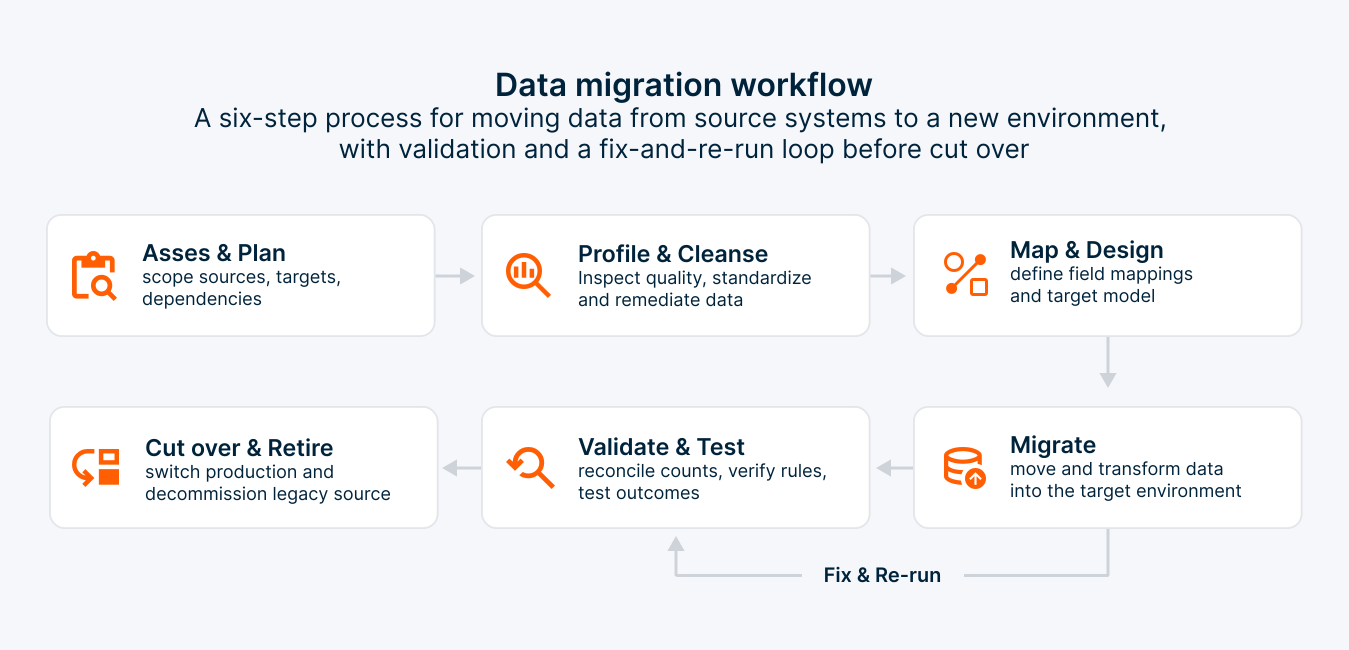
A data migration plan operationalizes the transition into a sequence of checkpoints. A typical plan has six steps:
- Assess and plan. Inventory the source systems, total data volumes, network dependencies, and downstream users. Then define the scope, acceptable downtime windows, validation criteria, and a rollback contingency—formalizing them into a data migration checklist.
- Profile the source data. Uncover duplicates, null gaps, and format collisions, then resolve them through data cleansing before the records are copied into the new environment.
- Map and design. Map every source field explicitly to its target and engineer the transformation rules that handle data type conversions, character encodings, and structural changes between the two engines.
- Migrate. Extract, transform, and load the data in controlled waves, starting with an isolated pilot set, and automating the pipeline so every run is repeatable.
- Validate and test. Reconcile row counts, financial totals, and random samples between the source and target. Then run data validation and user acceptance testing before pointing any production application at the new system.
- Cut over and decommission. Redirect users and applications to the new target, monitor query performance and error logs, and retire or archive the legacy source only after the new system proves stable.
Data migration strategies
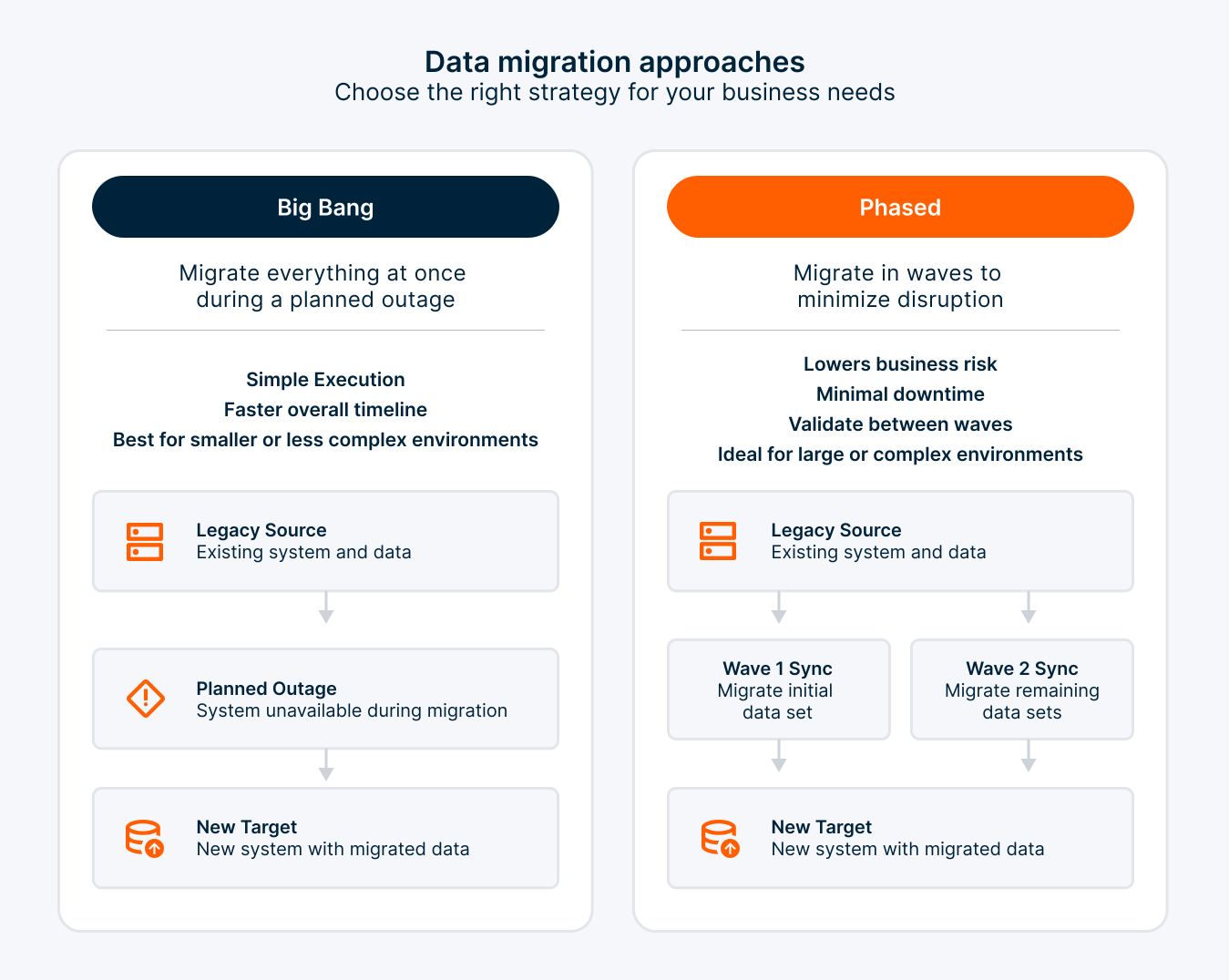
A data migration strategy decides how the move happens and how much risk the business accepts during it. Three approaches cover most projects:
| Big bang | Phased | Parallel run | |
|---|---|---|---|
| How it works | All data moves in one cutover window | Data moves in waves by system, region, or domain | Old and new systems run side by side until results match |
| Timeline | Shortest | Longer | Longest |
| Downtime | One planned outage | Little or none per wave | Little or none |
| Risk | High: a failure affects everything at once | Lower: problems stay inside one wave | Lowest, at the cost of running two systems |
| Best for | Smaller data sets with a tolerable outage | Large, complex estates | Systems where errors are costly, such as finance |
Data migration challenges
Data migrations run late or over budget when teams underestimate the friction of moving live operational data.
The main challenges are protecting data integrity and quality (data loss, duplication, or corruption), managing the complexity of the source and target environments, minimizing downtime, and meeting data privacy and security requirements.
Teams can avert many of these problems by learning from common data migration mistakes and how to avoid them.
Types of data migration tools
These tools range from simple data transfer tools, which are ideal for moving small amounts of data between systems, to comprehensive data migration software suites that can handle complex data transformations, data quality checks, and large-scale migrations. Some tools are specialized for specific types of data or systems, such as database migration services for Structured Query Language (SQL) Server, Oracle, or IBM Informix, while others are more versatile, supporting a wide range of data sources and targets, including cloud platforms like Google Cloud, Amazon S3, and Microsoft Azure.
Data migration tools can be broadly categorized into several types, including data integration tools, cloud migration tools, and database migration services. Data integration tools, such as Informatica PowerCenter and Oracle Data Integrator, focus on combining data from different sources and providing a unified view. Cloud migration tools, including AWS Database Migration Service and Azure Migrate, are designed to facilitate the transfer of data to cloud environments.
Database migration services, like the Amazon Web Services (AWS) Database Migration Service and IBM's database migration solutions, specialize in moving data between different database systems.
Teradata’s overview of data transfer tools offers a broader comparison of these categories.
Selecting the right data migration tool
Choosing the right data migration tool requires a thorough understanding of the specific needs and challenges of your migration project, including:
- Volume of data to be migrated
- Complexity of data and its structure
- Source and target systems
- Need for data transformation and cleansing
- Overall migration timeline
To streamline selection, focus on these key factors:
Assess the complexity and volume of the data to be migrated
This includes understanding the data types, structures, and the presence of any sensitive or regulated data. Tools like Informatica PowerCenter offer robust capabilities for handling complex data transformations and large volumes of data, making them suitable for enterprises with intricate data ecosystems.
Compatibility of the migration tool with both the source and target systems
For instance, if migrating to or from an SQL Server, tools specifically designed for SQL Server migrations, such as Microsoft's SQL Server Migration Assistant, can offer smoother integration and fewer compatibility issues. Similarly, for cloud migrations, choosing a tool that aligns with your cloud provider, such as Google Cloud, AWS, or Microsoft Azure, can use native optimizations and ensure a smoother migration process.
Scalability, security features, and the quality of support provided by the vendor
Scalability ensures that the tool can handle your current and future data migration needs, while robust security features protect your data during the migration process. Vendor support can be important in addressing any challenges that arise during the migration. Tools like AWS Database Migration Service, and Azure Migrate are backed by extensive documentation and support from their respective cloud providers, offering peace of mind throughout the migration process.
Data migration today: Hybrid estates, open table formats, and AI
Three developments shape data migration today:
- Hybrid is the default, since Flexera’s 2026 State of the Cloud report (a global survey of 753 respondents) finds that 73% of organizations run hybrid estates. Plans need a hybrid cloud architecture that lets both sides be queried together during and after the move.
- Open table formats such as Apache Iceberg and Delta Lake let several engines read and write the same data in object storage, with transactions and schema evolution. Migrating into an open format, often as part of a lakehouse, can replace repeated copy-and-convert projects with one governed copy.
- AI raises the bar for data readiness, because AI workloads need data that is clean, governed, and accessible, which is why modernization programs increasingly start with a data migration.
Business impact of picking the right data transfer tool
Selecting the appropriate data migration tool can have a profound impact on an enterprise's operational efficiency and strategic capabilities. The right tool can significantly reduce the time and resources required for data migration, minimize downtime, and ensure data integrity and security. This, in turn, enables businesses to quickly leverage their data in new systems, driving insights, innovation, and competitive advantage. For instance, using a robust data migration tool like Informatica PowerCenter or AWS Data Pipeline can streamline the migration process, allowing businesses to focus on extracting value from their data rather than dealing with the complexities of migration.
By facilitating seamless data migration, these tools help to ensure that data is accurate, consistent, and readily available across the organization. This is critical for making informed decisions, complying with regulatory requirements, and fostering a culture of data-driven innovation. Tools that support comprehensive data integration, transformation, and quality checks are particularly valuable in this regard, as they enable businesses to maintain high standards of data quality and integrity throughout the migration process.
Ultimately, the choice of data migration tool can significantly influence an organization's ability to efficiently manage and utilize its data assets. By carefully selecting a tool that aligns with specific needs and challenges, businesses can enhance operational efficiency, improve data quality, and accelerate digital transformation initiatives. This strategic approach to data migration not only supports immediate project goals but also lays the foundation for ongoing innovation and success in the data-driven business landscape.
How Teradata supports data migration
Teradata approaches migration as a step toward a governed data foundation rather than a one-time move. Organizations can migrate to Teradata Cloud, the cloud deployment of the Teradata Autonomous Knowledge Platform, or to Teradata Factory for on-premises environments with sovereignty and regulatory requirements, and run the same governance across both.
To learn more, discover how the Teradata Autonomous Knowledge Platform gives migrated data a governed home for analytics and AI.
Frequently asked questions
ETL에서 데이터 마이그레이션이란 무엇인가요?
ETL에서 데이터 마이그레이션이란 무엇인가요?
ETL에서 데이터 마이그레이션은 추출, 변환, 로드 단계를 사용하여 데이터를 원본 시스템에서 새로운 타겟으로 이동시키고, 타겟의 구조로 변환하는 변환 규칙을 사용하는 일회성 프로젝트입니다.
데이터 마이그레이션의 주요 과제는 무엇인가요?
데이터 마이그레이션의 주요 과제는 무엇인가요?
주요 데이터 마이그레이션 과제는 데이터 무결성 보호(손실, 중복 또는 손상 방지), 복잡한 이기종 시스템 관리, 다운타임 최소화, 개인정보 보호 규정 준수 등이 포함됩니다.
기업은 데이터 마이그레이션 과정에서 위험을 어떻게 줄일 수 있을까요?
기업은 데이터 마이그레이션 과정에서 위험을 어떻게 줄일 수 있을까요?
조직은 상세한 계획 및 평가 단계를 실행하고, 전문 마이그레이션 도구를 활용하며, 단계별 테스트를 수행하고, 명확한 롤백 전략을 준비함으로써 데이터 마이그레이션 위험을 최소화하여 비즈니스 연속성을 보장할 수 있습니다.
특정 프로젝트 요구에 맞는 데이터 마이그레이션 도구를 선택하는 것이 왜 중요한가
특정 프로젝트 요구에 맞는 데이터 마이그레이션 도구를 선택하는 것이 왜 중요한가
정렬된 데이터 마이그레이션 도구는 시스템 호환성을 보장하고, 필요한 데이터 볼륨과 변환을 효율적으로 처리하며, 데이터 정제, 데이터 검증, 강력한 보안과 같은 필수 기능을 제공합니다. 적절한 도구 선택은 마이그레이션 속도와 정확성을 높이면서 미래의 필요에 맞게 확장됩니다.
7가지 이주 전략은 무엇인가요?
7가지 이주 전략은 무엇인가요?
7가지 마이그레이션 전략, 흔히 7R이라고 불리는 이 전략은 은퇴, 유지, 재호스팅, 재배치, 재플랫폼, 재구매, 리팩토링입니다. AWS와 마이크로소프트의 클라우드 마이그레이션 프레임워크는 각 워크로드별로 무엇을 이동하고, 무엇을 변경하며, 무엇을 그대로 둘지 결정하는 데 이를 사용합니다.